What's New in Feedr - October 2026

By Jacob Mølby, Partner ·

This round is mostly about catalogs. Meta and TikTok vehicle and travel catalogs work like any other channel, each Meta catalog has its own page, and Feedr stops Shopify from quietly replacing your images. Agencies get their own account type, and templates take their colors from the product photo.
Agency accounts
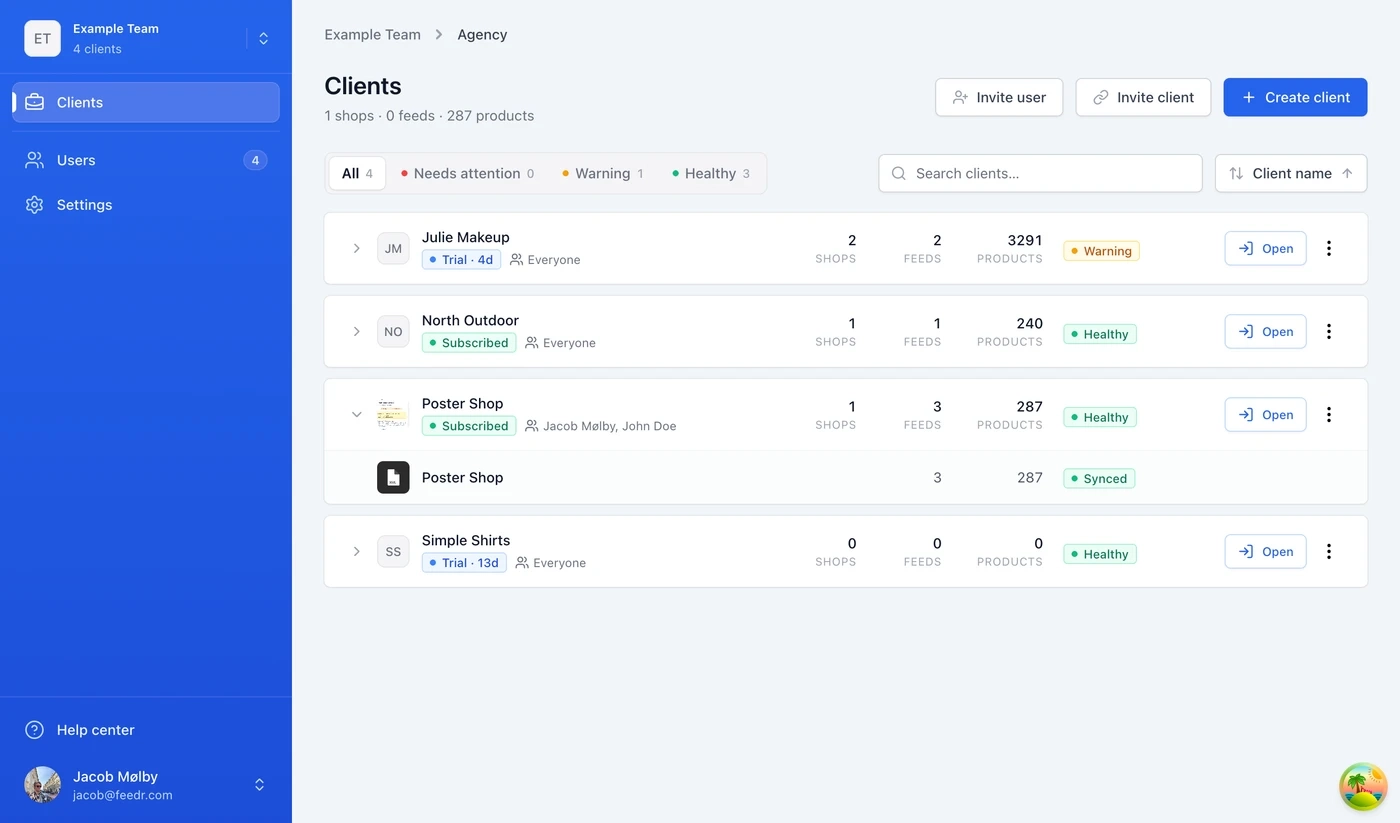
If you run feeds for several clients, an agency account gives you one place to manage them. Each client keeps their own team, shops and subscription. Your agency team holds your colleagues, and for each client you decide whether everyone or only selected people get access.
The Clients page lists every client with their subscription status, shop, feed and product counts, and a health status: Healthy, Warning or Needs attention. Filter down to the clients that need attention, and click Open to go straight into their team.
There are two ways to add a client. You can create a new client team yourself, or send an existing Feedr customer an invite link that connects their team to yours. Clients can see which agency has access from their own Users page, and can disconnect at any time.
New signups choose Agency when asked what type of business they are. If you already use Feedr and want an agency account, ask us on the live chat.
Read more about agency accounts →
Vehicle, destination, hotel and flight catalogs
Meta and TikTok both have catalog types beyond products. Car dealers use vehicle catalogs, and travel businesses use destination, hotel and flight catalogs.
Meta vehicle and destination catalogs
Meta vehicle and Meta destination feeds connect through the Meta integration like product feeds do, as a primary or supplementary source. The catalog picker shows matching catalogs first.
Template variants work on these feeds too. A dealer can run designed creatives in automotive inventory ads and use Manage Meta Ads to change variants and fix issues on those ads, in the app and in the Chrome extension. The catalog page has a Vehicles or Destinations tab, so you can browse what Meta actually holds.
TikTok vehicle, hotel, flight and destination catalogs
Four TikTok channels cover vehicles, hotels, flights and destinations. Each feed is a CSV in the layout TikTok expects for that catalog type, so a dealer sends make, model, year and mileage, and a hotel sends its address, star rating and room types. Templates apply to the images the same way they do on the regular TikTok channel.
A page for each Meta catalog
Each feed's Connect to Meta page has Connection and Fetch log tabs, and gives you four ways to connect: through your Meta Business Portfolio, by reusing the integration from another shop on your team, by sending an admin link to whoever has admin access in Meta, or manually.
Each connected catalog has its own page:
- Overview. Product count, data sources, Meta Pixels and match rate.
- Products. Search and filter by source, availability, product set and whether a product is eligible for catalog ads, and see the images Meta has for each product.
- Data sources. Primary sources, language feeds, country feeds and any unattached feeds.
Match rate shows how many product IDs from your pixel and app events over the last 28 days match products in the catalog, split into product views, add to cart and purchases. A low match rate means Meta can't link those events to your products, which weakens your catalog ads.
In Manage Meta Ads, the ad preview has a Placement picker covering Facebook and Instagram Feed, Stories and Reels, plus Facebook Marketplace and Instagram Explore. And an Image fit setting (None, Automatic, Expand, Zoom or Crop) lets you choose how Meta crops your images.
Read more about connecting a feed to a Meta catalog →
Stop Shopify replacing your images in Meta
If your store uses Shopify's Meta app, Shopify can send its own images for each country and language. Meta shows those instead of your Feedr templates, so your supplementary feed looks like it isn't working.
Feedr checks for this. If the catalog has Shopify image overrides when you connect a feed, you get a warning and a recommendation to add the feed as a primary source instead. For feeds that are already connected, the feed card has a Remove Shopify image overrides option that walks you through the fix: change Shopify's sync setting in Meta so it only updates price and availability, switch the Feedr feed to primary, and Feedr removes the overrides. On the catalog's Products tab, each affected product shows how many locales Shopify replaces its images in.
Template colors from the product image
Any color in a template can come from the product photo. That covers fills, strokes, shadows, gradient stops, text, highlights and the background. Open the color picker, switch to the Product tab, choose which product image to read from, then pick one of these:
- Backdrop. The color at the edges of the photo.
- Main color. The color that covers most of the image.
- Average. The average of the whole image.
- Product color. The product itself, with a plain background left out.
Each of them also has a complementary version.
Use it for a background that blends with each photo, or a price badge in the product's own color. It works across thousands of products without a rule for every color.
Template editor layout
Format tabs (Default, 4:5 Portrait and 9:16 Story) sit in the top bar, so the canvas gets the full height of the editor. The tools for adding images, text, shapes, assets and icons are an icon row at the top of the Layers panel, and zoom, undo and redo float under the canvas.
On the 9:16 format, a Safe zone picker shows which areas Meta Reels, Meta Stories, TikTok and Pinterest cover with their own buttons and captions, so your prices and text stay visible. The overlay never shows up in the exported image.
Layers with conditions get a badge showing whether those conditions are met for the product you're previewing.
4:5 and 9:16 on every channel
Portrait and story formats work on every channel. On feeds without template variants (Google Shopping, TikTok and others), the template picker in output mapping has a Format option with 1:1, 4:5 and 9:16.
Google Shopping's lifestyle_image_link takes a template too, so you can send a designed lifestyle creative alongside the main product image. The Preview images page lets you preview any field that takes a template, not just the main image.
Conditions on tags and internal fields
Element conditions can use product tags and your shop's internal fields. Number fields support greater than and less than. For example, show a Bestseller badge on products tagged bestseller, or a badge that depends on an internal field for margin. Creatives update when the tags change.
Read more about conditions in templates →
Extract mutation
The Extract mutation fills fields your shop doesn't supply, like color, material or size, by finding terms in other text. Give it a list of terms with an output value for each, point it at the title or description, and it outputs the value for the term it finds. Map navy, midnight and indigo to Blue, and a description that mentions "midnight" gets the color Blue. That's one mutation instead of a rule for every color.
By default it matches whole words, and the longest match wins. Options let you match inside words, follow the order of your list, make the match case sensitive, output every match or set a fallback value. Extract (Google Sheet) does the same with the list kept in a Google Sheet.
Backup payment cards
You can save up to five payment cards and choose which one is primary. If the primary card is declined, Feedr tries the others in the order you added them, so an expired company card doesn't pause your feeds. A banner also warns you before the primary card expires.
Manage your cards under Payment Method in billing.
Emails in your language
Emails are sent in English, Danish, Spanish or Brazilian Portuguese. Account emails follow each user's own language. When you invite someone new, you choose the language of the invitation, and their account starts in that language.
Pending invitations can be resent from the team's Users page. If an invitation is still pending after three days, the person who sent it gets a reminder.
Smaller improvements and fixes
- When you create a Meta country or language feed, you pick the country or language straight away, preselected from your shop.
- New teams get their company logo automatically, found from the website you enter.
- Shop icons show a country flag, which helps when you run one store per market.
- The font picker opens with Your fonts: the fonts already in the template, then fonts you've starred.
- Text elements made before rich text convert to rich text in one click, and the conversion can be undone.
- Prices like
499,-get a Dash letter spacing setting to tighten the dash. - Image elements let you pick images 1 to 15, even if the product you're previewing has fewer.
- Images from product data accept SVG files, which is handy for brand logos.
- Align and distribute treat a selected group as a single element.
- Replace and Remove have a case sensitivity toggle. Existing mutations stay case sensitive.
- The List reverse mutation flips the order of a list.
- Replace (Google Sheet) and Remove (Google Sheet) match entries like
Black (Matte)as plain text. - Shopify metafields like color and size import in the shop's language, the same as titles and descriptions.
- Instant updates from Shopify include every variant, also on products with more than 100.
- When several Feedr shops sync the same Shopify store at once, imports wait and retry.
- Product counts on filtered feeds match the products in the feed.
- You can duplicate a feed while it's processing.
- When a catalog has several Feedr feeds, Manage Meta Ads uses the template variants from the feed behind each ad's product set.
- When Meta rejects an ad's manual destination, the error tells you how to fix it in Ads Manager.
- Meta ad analysis doesn't flag the collection option.
That's it
More on the way. If something isn't working the way you expect, or you want to tell us what to build next, use the live chat on the site.